Add Shapes A
Add Shapes
Click to set arc center
Esc = step back · trace CW or CCW
Radius:
auto from last arc
Diameter = 200
Places N copies rotated around the origin.
Or click anywhere on canvas. Cyan ring = snapping to origin.
Rotate & Repeat
i
↻ Rotate
⟳ Orbit
Center X / Y (advanced)
Mirror / Flip Layer
i
Repeat One Shape
i
⟳ Orbit
↻ Rotation
Repeat Entire Composition
i
Click first alignment point
i
Esc to cancel
Click any connector to select it for extending.
Through-line mode
i
Generate Line at Angle
i
Click to set reference start point
Esc to cancel · mouse side flips direction
Symmetry
Line mirrored to all 6 rotational positions.
Extend Connector
Alt+click any connector (from any tool) to select it. Orange = symmetric matches that will also extend.
The arrowhead marks the end that Extend → will grow toward.
Line Style
i
Layer: Construction
Color is set by the active layer — change it via the layer's color dot
in the Layers panel (right).
Symmetry
Click any segment — cuts equivalent segments across all 6 rotational positions.
Every other = alternating positions (great for star points).
Every other = alternating positions (great for star points).
Tile Composition
i
60° per copy · Hexagonal
Step X 0
Step Y 0
Nudge X
i
Nudge Y
Alt. Row/Col Offset
i
Row shift
Col shift
◈ Bands
⬡ Regions
Closed Regions
i
Close gaps ≤
u
i
Auto-group by shape type + size i
Create Offset Bands
i
Select Style
Mitered
Woven
Outline
Overlap
◈ Strands alternate over/under automatically at each crossing; the
under strand gaps beneath the over strand. Width is the TOTAL band
width, centered on each drawn line. Preview → click a teal
crossing to flip its over/under.
Clicking a preview crossing flips it across all 6 rotational positions.
Weave review: click any teal crossing to flip over/under. Gold marker = you flipped it.
0 flips
SNAP
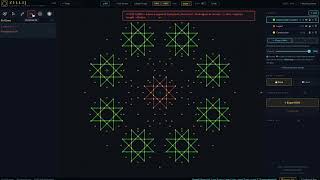
✂ CUT LINES MODE — hover a segment · click to cut (click again to restore) · ⌥ click = capture length → Radius
Layers
Save / Load
Reference Image
i
📷
50%
Clean Up
i
Zillij — Islamic Geometry Studio
© 2026 Frederick Kahl
Built with Claude Code · Anthropic